Why Mobile Device Management (MDM) is Critical for Remote Workforces
A new hire in Dubai gets their MacBook couriered to their apartment. Nobody from IT is there to open the box, connect it to the office network, or check that the right policies landed. That’s the whole job now: the device has to configure, secure and connect itself, correctly, the first time — because there’s no second visit from IT to fix it.
That single shift is why Mobile Device Management (MDM) stopped being a nice-to-have and became the backbone of how Apple or mixed fleets get managed at all. Without it, remote work doesn’t just get slower. It gets riskier, quietly, in ways that only surface during an audit or an incident.
When your team was in one building, IT had a physical checkpoint: someone could walk a laptop to a desk, plug it in, and confirm it was configured correctly. Remote work removed that checkpoint, but many companies kept the same manual habits — just over a video call instead of a hallway. The result is a gap between what IT assumes is true about a device and what’s actually true.
That gap shows up in familiar ways:
- A new hire in another city or country receives a Mac with nobody nearby to walk them through setup.
- IT can’t confirm whether a remote employee’s home network setup meets basic security requirements.
- A support ticket that would take ten minutes in the office takes an hour when the device is remote and the fix depends on the user following instructions correctly.
- Nobody can say with certainty that a laptop from an employee who left two months ago was properly locked or wiped.
- Software updates and security patches land inconsistently, because devices aren’t always connected when a policy pushes.
- Two offices — say, Madrid and Dubai — end up running slightly different device configurations because nobody standardized before people spread out.
None of this means remote work is inherently less secure. It means the old, proximity-based way of managing devices doesn’t work anymore, and hasn’t been replaced with something built for how people actually work now — the same disconnect we broke down in When Your MDM Is Broken, Your Security Is Too.
Best Practices for Implementing MDM in Remote Work Environments
We don’t start a remote-work MDM project by comparing feature lists — we’ve written separately about how to choose the right MDM platform if that’s where you’re stuck. For remote teams specifically, we start by assuming no device will ever touch an office network, and designing backwards from there:
- Define standard configurations per role before a single device ships, so “what should this Mac look like” isn’t a judgment call made on the fly.
- Automate enrollment through Apple Business and Zero-Touch, automated device enrollment — we walk through exactly how this works in our guide to Zero-Touch deployment — so a device configures itself correctly the moment it connects to the internet, no matter which country it’s in.
- Enforce policy remotely — encryption, passcodes, VPN or SSO — instead of relying on someone physically checking the device.
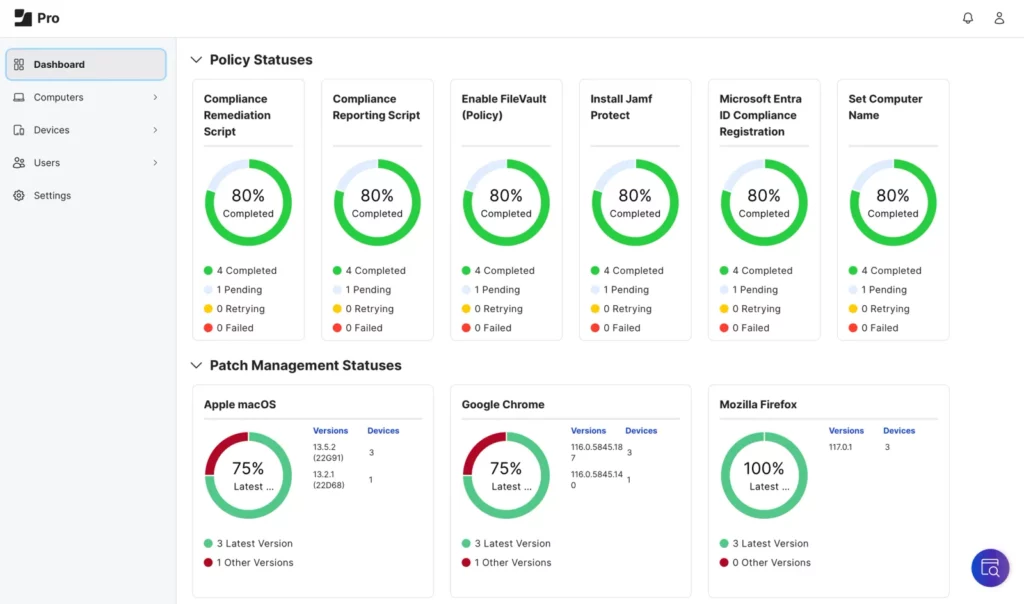
- Monitor compliance centrally, so IT can see the real state of every device regardless of where the person using it is sitting.
- Document remote offboarding explicitly: who triggers a remote lock or wipe, and how fast it happens, when someone leaves the company.
Each of these turns a step that used to depend on physical proximity into one that works the same whether someone is in Madrid, Dubai, or a co-working space in between.
Common Challenges of Mobile Device Management in Remote Work
Even a well-designed MDM setup runs into friction that’s specific to distributed teams. The most common ones we see:
- Inconsistent connectivity. A policy that assumes daily check-ins doesn’t work well for someone traveling or on a slow home connection.
- Blurred personal/business boundaries. Remote employees are more likely to use a device for both, which complicates how strict a policy can reasonably be.
- Time zone gaps in support. A device issue at 6pm in Madrid is 9pm in Dubai — support coverage has to account for that, not assume everyone’s in the same working hours.
- Platform sprawl. Teams that grew quickly sometimes end up with Jamf in one region and Hexnode or Intune in another, making a single compliance view harder to get.
At a professional services client with teams split between Madrid and Dubai, this last point was the real blocker: two regional offices had picked different MDM platforms independently, and nobody could produce a single accurate compliance report across both. Consolidating onto one platform and one policy set — not a bigger tool, just one that was actually shared — cut the compliance reporting time from days to under an hour.
Future Trends in MDM for Remote Workforces
A few shifts are worth planning for now rather than reacting to later. Conditional access is becoming standard: instead of a device either having full access or none, systems increasingly check a device’s real-time compliance status before granting access to sensitive data, wherever that device happens to be. MDM and endpoint security tools are also converging, giving IT one view of both device configuration and threat activity instead of two disconnected consoles. And as regulatory attention on data protection grows, see our breakdown of the UAE National Cybersecurity Strategy for what’s already changing there — expect compliance reporting for remote Apple fleets to be requested more often, and with less notice.
None of these trends require you to rebuild your environment from scratch. They do reward having a clean, well-documented MDM foundation now, so each new requirement is a policy update rather than a project.
If you want to see how a remote-ready Apple device management setup would look for your team, we’re happy to take a look — no strings attached.